Garmin Dash Cam Tandem Review: Features, Pros, Cons, and Buyer Advice
The garmin dash cam tandem review answer is a conditional yes: Garmin’s two-lens camera makes sense if you want one windshield-mounted unit to record both the road ahead and the cabin. It’s a less natural fit if you only need a simple forward-facing camera or want rear-window footage.
The appeal is practical. One lens points through the windshield, while the other faces into the vehicle, so a rideshare driver or someone who regularly carries passengers can document more than what happened in front of the hood.
There’s a trade-off: the cabin-facing camera is not a rear-window camera, and its lower video resolution gives you less detail than the forward lens. Two views are useful, but they don’t automatically mean two equally clear recordings.
Below, you’ll find the verified camera details, what they mean in everyday driving, setup checks worth making before buying, and the situations where a simpler dash cam may be the better choice.
Garmin – Tandem Front and Rear Camera Dash Cam: Key Features and Specifications
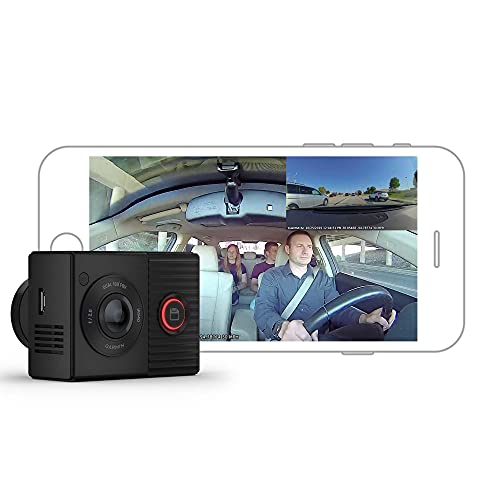
The word “rear” in the product name needs a little clarification. The Garmin – Tandem Front and Rear Camera Dash Cam uses a second lens to record the vehicle’s interior; it isn’t a separate camera mounted at the back window to film traffic behind you. That distinction can make or break the fit if your main goal is rear-road coverage.

- Front video: 1440p resolution. That gives the road-facing camera more recorded detail than the interior camera, which can help when you need to review the scene ahead. Resolution alone doesn’t guarantee that a plate or other small detail will be legible; distance, motion, lighting, and the windshield all matter.
- Interior video: 720p resolution. This is a lower-resolution cabin view, so it’s better understood as a record of activity inside the vehicle than a promise of fine detail across the whole cabin.
- Both lenses have a 180-degree field of view. A wide view can include more of the road or passenger area, which is helpful in a multi-seat vehicle. The trade-off is that very wide-angle video can make distant objects look small.
- NightGlo infrared cabin recording. Infrared illumination helps the interior camera record in low-light conditions without depending on ordinary cabin lighting. It doesn’t turn the camera into a high-resolution night-vision system, so set expectations around usable context rather than perfect detail.
- GPS, voice control, and Garmin Drive app connectivity. GPS can associate recorded footage with location information, while voice control offers a way to save footage without reaching for the camera. The app provides a way to review footage on a compatible phone; check your phone and the current app requirements before buying.
Together, these features point to a specific use: a driver who wants a forward road view and an inside-the-car record in a single device. They don’t add a view of the road behind the vehicle, and the interior footage shouldn’t be treated as a second high-detail road camera.
How Garmin – Tandem Front and Rear Camera Dash Cam Performs in Everyday Use
Think of the Garmin – Tandem Front and Rear Camera Dash Cam as a two-angle recorder for situations where the cabin matters as much as the road. The scenarios below are expectations based on its camera layout and published features, not claims from personal testing.

Garmin – Tandem Front and Rear Camera Dash Cam for rideshare and passenger trips
If you drive passengers for work, the cabin-facing lens can add context that a forward-only camera misses. A recording may help establish what was happening inside the car during a dispute or unusual incident, while the forward lens captures the road scene.
That’s not a guarantee that every person or detail will be clearly identifiable. The cabin camera records at 720p, and its wide view spreads the image across a broad area. Consider where the camera will sit, how many rows of seats you need to cover, and whether your local rules or platform policies restrict recording passengers.
Garmin – Tandem Front and Rear Camera Dash Cam on dark trips
The infrared cabin feature is relevant for night shifts, evening pickups, and other trips where the interior may be dim. It gives the inside-facing camera a way to record in low light without relying on visible cabin lights.
The road-facing view is a separate question. Don’t assume that infrared cabin recording means the forward camera can capture every detail on a poorly lit road. Headlights, street lighting, windshield glare, weather, and the quality of the scene can all affect what a recording shows.
Garmin – Tandem Front and Rear Camera Dash Cam after a road incident
GPS and voice control add practical options when reviewing an event. Location information can help place footage in context, and a spoken save command can be more convenient than trying to reach for a button while driving. Any voice feature still depends on the supported commands and operating conditions, so check Garmin’s current instructions rather than assuming every phrase will work.
There’s also an important coverage limit: the cabin-facing lens looks into the vehicle, not out through the rear glass. If you need evidence of a rear-end impact or traffic approaching from behind, this camera’s two-lens arrangement doesn’t provide that view.
Garmin – Tandem Front and Rear Camera Dash Cam: Design, Fit, and Setup
The Garmin – Tandem Front and Rear Camera Dash Cam combines its road-facing and cabin-facing lenses in one windshield-mounted unit. That keeps the arrangement simpler than installing separate front and interior cameras, but placement has to work for both views at once.
Before mounting, check that the forward lens has a clear path through the windshield and that the interior lens faces the seats you want recorded. A position tucked behind the rear-view mirror may keep the camera less distracting, but trim, mirror shape, tint, and the lens angle can interfere with one view or the other. Confirm both views from the intended mounting position before settling on it.
Clean the glass where the mount will sit and avoid placing the camera where it blocks your view of the road. If the vehicle has a steeply raked windshield, an unusual mirror assembly, or a large sensor housing, check the available space and the mounting instructions before purchase. Don’t assume a mount that fits one car will fit every windshield equally well.
Power and storage deserve a separate check. Confirm what’s included with the particular listing, whether you need to provide a compatible memory card, and how the power cable can reach the vehicle’s outlet without crossing the driver’s controls. If you want the camera to operate while parked, verify the required power arrangement and feature support first; don’t assume that a normal drive-time connection provides parking coverage.
For phone-based footage review, check that your phone supports the Garmin Drive app and that you’re comfortable using an app as part of the process. Also consider where you’ll stop to review or transfer recordings. Handling camera settings or video while driving is a distraction, not a convenience feature.
What Works Well with Garmin – Tandem Front and Rear Camera Dash Cam (pros)
- One unit records the road and cabin. That’s useful for rideshare work, passenger transport, or anyone who wants interior context without mounting a second camera.
- The forward camera records at 1440p. Its higher resolution than the cabin lens gives the road-facing view more recorded detail to work with when you review an incident.
- The cabin camera has a 180-degree view and infrared recording. The wide view can cover a broad section of the interior, and infrared is suited to recording the cabin when ordinary lighting is limited.
- GPS and voice control add practical tools. Location data can help you understand where a clip was recorded, while voice commands can reduce the need to reach toward the camera to save footage.
Where Garmin – Tandem Front and Rear Camera Dash Cam Falls Short (cons)
- It doesn’t record the road behind the vehicle. The second lens faces the cabin, so buyers who need rear-window traffic footage should look for a system with a separate rear-facing road camera.
- The cabin lens records at 720p, not 1440p. You get a lower-resolution view inside the vehicle, which may be a limitation if fine detail across the cabin matters to you.
- One mounting position has to suit two views. A spot that gives the forward lens a clear windshield view may not frame the cabin as well as you’d like. Check your mirror, windshield, and seat layout before committing.
- Phone-based review and setup may not suit everyone. If you prefer a screen-first camera or don’t want to manage footage through an app, confirm that the available controls match your habits.
Who Should Buy Garmin – Tandem Front and Rear Camera Dash Cam?
The Garmin – Tandem Front and Rear Camera Dash Cam is aimed at drivers who want the front road view and an interior record from one windshield-mounted device. It’s worth considering if you regularly drive passengers, use your vehicle for rideshare work, or want the cabin recorded alongside the road during routine trips.
It may also suit drivers who value a wide interior view and expect to make trips in low-light conditions. The infrared feature is relevant here, though the cabin resolution remains 720p. Think of it as added context, not a guarantee that every face or object will be clearly resolved.
Before buying, ask yourself these practical questions:
- Do you want to record the cabin, or do you actually need a camera aimed through the rear window?
- Will one windshield position provide a clear view of both the road and the part of the interior you care about?
- Are you comfortable checking footage and settings through a compatible phone and the Garmin Drive app?
- Have you confirmed the listing’s included accessories, memory-card requirements, power setup, and current app compatibility?
- Do your local laws, employer rules, or passenger-service policies allow the recording you intend to make?
The answers matter more than the two-camera label. If interior recording is the reason you’re shopping, this layout may be a good match. If you’re buying it because you expect front-and-rear road footage, you’ll want a different camera arrangement.
Who Should Skip Garmin – Tandem Front and Rear Camera Dash Cam?
Skip this model if you need a view through the rear window to document traffic behind you; choose a dash-cam system with a separate rear-facing road camera instead. The Tandem’s second lens points into the cabin, so it can’t provide that missing rear-road angle.
It’s also a poor fit if your priority is equally detailed footage from both lenses. The front camera records at 1440p, while the interior camera records at 720p. That difference is easy to overlook when shopping by camera count alone.
If you want a straightforward, single-view setup, consider a front-only dash cam with one outward-facing lens and a resolution that meets your needs. If you’re considering another Garmin model, verify its actual camera direction and specifications rather than assuming that a smaller or newer-looking camera provides cabin or rear-window coverage.
Finally, pass if you can’t confirm a workable mount and power route in your vehicle, or if you don’t want an app involved in setup and video review. Those aren’t proven defects in the camera; they’re fit and workflow questions worth settling before you spend money.
FAQs About Garmin – Tandem Front and Rear Camera Dash Cam
Does Garmin – Tandem Front and Rear Camera Dash Cam record the road behind the car?
No. Its second lens records the vehicle interior. For a view through the rear window, look for a dash-cam system with a separate rear-facing road camera.
What resolutions do Garmin – Tandem Front and Rear Camera Dash Cam lenses record?
The forward lens records at 1440p, and the cabin-facing lens records at 720p. That makes the road view higher-resolution than the interior view.
Can Garmin – Tandem Front and Rear Camera Dash Cam record the cabin in low light?
It has NightGlo infrared cabin recording for low-light interior conditions. That helps provide a cabin view when the vehicle is dark, but it doesn’t make the 720p lens a high-detail camera.
Does Garmin – Tandem Front and Rear Camera Dash Cam work with a phone?
It supports Garmin Drive app connectivity. Check current app requirements and your phone’s compatibility before buying, and plan to review footage when safely parked.
Garmin – Tandem Front and Rear Camera Dash Cam Final Verdict: Is It Worth Buying?
The Garmin – Tandem Front and Rear Camera Dash Cam is a focused choice, not an all-purpose answer to every dash-cam need. Its strongest case is the combination of a 1440p road-facing camera and a 720p infrared-capable cabin view in one windshield-mounted device.
The main compromises are just as specific: the second lens doesn’t record the road behind you, the two views don’t have the same resolution, and placement has to work for both. Check the fit, app requirements, storage, and power details before ordering.
For rideshare drivers and other motorists who want cabin footage alongside the road view, this garmin dash cam tandem review comes down to a qualified recommendation. If your priority is rear-window coverage, a simpler front-only camera, or equal detail from both lenses, choose a different setup.