Garmin Dash Cam Mini 3 Review: Features, Pros, Cons, and Buyer Advice
A **garmin dash cam mini 3 review** points to a simple choice: this is a good fit if you want a discreet front-facing camera and can live with 1080p video and app-dependent features. It’s less appealing if you need a screen, detailed setup information up front, or advanced coverage without a subscription.
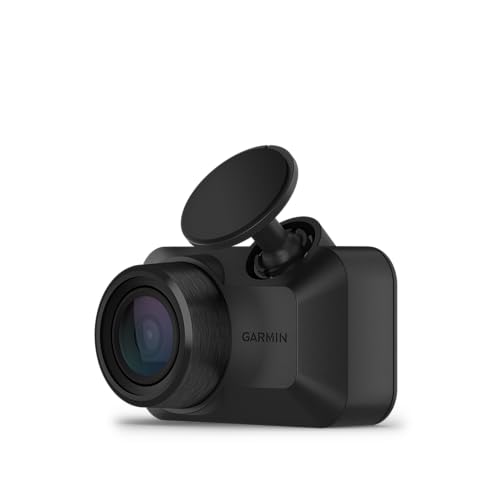
The Ultracompact 1080p HD Dash Cam Records 1080P HD Video is designed to stay small behind the rearview mirror, while its 140-degree field of view covers a broad stretch of road ahead. Automatic incident saving, voice commands, and a built-in glare-reducing polarizer address everyday annoyances, from forgetting to save a clip to reflections across the windshield.
The trade-off is that some of the most convenient remote features depend on a paid Vault subscription, an active Wi-Fi connection, and, for parking features, continuous power. The product information also doesn’t establish every detail buyers often want before installation, such as storage-card requirements.
Below, you’ll find what the listed specifications mean in practice, how to think about fit and power, and where this camera may not meet your needs. The goal is a clear buy-or-skip decision, not a promise that every feature will suit every car.
Ultracompact 1080p HD Dash Cam Records 1080P HD Video: Key Features and Specifications
This is a small, forward-facing dash camera built around a straightforward job: record the road, save footage of detected incidents, and give you a way to review or share clips. Here are the specifications and features that matter most when deciding whether that setup is enough.

- 1080p HD video: The camera records at 1080p, which gives you standard high-definition footage without the larger resolution implied by 2K or 4K cameras. It can document a drive, but buyers who prioritize the finest detail for distant signs or license plates may prefer to compare higher-resolution options.
- 140-degree field of view: This wide view takes in more of the road ahead than a narrow, straight-ahead frame, which can help show activity toward the edges of the scene. It still isn’t a substitute for a rear camera or a true multi-angle system.
- Built-in Clarity polarizer: The polarizing lens is intended to reduce windshield glare and reflections. That’s useful in bright conditions, though it shouldn’t be treated as a guarantee of perfectly clear footage in every lighting or windshield setup.
- Automatic incident saving: The camera automatically records and saves video of detected incidents, so you don’t have to rely only on remembering to press a button after a stressful moment.
- Voice control: Spoken commands can save video and start or stop audio recording. Voice control is available in English, German, French, Spanish, Italian, and Swedish, so check that your preferred language is supported.
- Garmin Drive app and Vault: The online Vault can store important saved clips for viewing and sharing through the app. Vault storage and remote features require a paid subscription; without one, file viewing and downloading are limited to when you’re near the camera.
Remote live view and parking notifications have additional conditions: the listing specifies a paid Vault subscription, a compatible phone running Garmin Drive, an active Wi-Fi connection, and constant power. Treat those requirements as part of the system, not optional fine print, if remote access is the reason you’re considering this model.
The product information doesn’t state a recording frame rate, storage-card capacity, or whether a card is included. Confirm those details in the current listing or setup documentation before buying, especially if you want to estimate how much footage you can keep or avoid a second trip to the store.
How Ultracompact 1080p HD Dash Cam Records 1080P HD Video Performs in Everyday Use
For a routine commute: The small body is intended to stay unobtrusive, while automatic recording and incident saving reduce the need to fiddle with controls during a drive. That’s a sensible arrangement for someone who mainly wants a record of what happens ahead and doesn’t need to watch a screen while driving.

For glare-prone routes: The built-in polarizer is meant to cut down reflections from the windshield, which can otherwise compete with the road in recorded footage. Expect it to help with glare, not erase every reflection; the result can still depend on the windshield, lighting, and camera position.
After an incident: Automatic saving may preserve a detected event without requiring you to find a manual control. Voice control offers another way to save video, but spoken commands are not a replacement for checking how clips are stored and how you’ll retrieve them later.
The app is central to that retrieval process. If you don’t pay for Vault, the listed arrangement is that you can view and download files when you’re near the dash cam; remote live view and online clip access are not simply included by default.
What to expect from the Garmin Dash Cam Mini 3 while parked — Ultracompact 1080p HD Dash Cam Records 1080P HD Video
Parking Guard is meant to notify you if the camera detects an incident while the vehicle is away. That’s potentially useful in a driveway or parking lot, but the feature requires a paid Vault subscription, constant power, an active Wi-Fi connection, and the Garmin Drive app on a compatible smartphone.
Those conditions make Parking Guard a setup decision, not a guaranteed benefit from plugging in the camera. If your car’s power outlet shuts off when you turn off the ignition, ask how the required constant power would be provided before counting on parking alerts.
The app can also show synchronized clips from up to four Garmin dash cams, each sold separately. That could help someone planning multiple camera viewpoints, but it adds equipment and setup; this single camera by itself only supplies its own view.
Ultracompact 1080p HD Dash Cam Records 1080P HD Video: Design, Fit, and Setup
The key-sized design is aimed at drivers who don’t want a large display or bulky device taking up windshield space. Before installation, check where the camera would sit relative to the rearview mirror, your sightlines, and any sensors or other equipment already mounted near the windshield.
A discreet position can keep the camera out of the way, but it still needs a clear view through the glass. Avoid placing it where a dark windshield tint, a dotted frit area, or a wiper’s unused sweep could interfere with the view; confirm the intended mounting position against the vehicle and the camera’s instructions.
Garmin Dash Cam Mini 3 power and app checks before installation — Ultracompact 1080p HD Dash Cam Records 1080P HD Video
The available product details don’t specify the included power accessories or the exact installation method for every vehicle. Check the current package contents and setup guide before assuming the cable will reach a convenient outlet or that a particular hardwiring option is included.
For ordinary recording, plan for a reliable power connection and a compatible smartphone for app setup and file handling. For Parking Guard or remote live view, verify that you can provide constant power and meet the Wi-Fi and subscription requirements; a camera that loses power with the ignition won’t meet the stated parking-feature condition by itself.
Also check storage before the first drive. Since the supplied details don’t confirm whether a memory card is included or what capacity is supported, verify both points with the seller or documentation rather than discovering the gap when you’re ready to install.
Keep the lens area and the patch of windshield in front of it clean. Dust or smears can show up in footage, and a polarizer isn’t a substitute for a clear lens. For long-term care or changes to the mount, follow Garmin’s instructions instead of guessing at adhesives or cleaning products.
What Works Well with Ultracompact 1080p HD Dash Cam Records 1080P HD Video (pros)
- Small, discreet format: A compact camera can suit drivers who want a recording device without a prominent screen or a large object in their forward view.
- Broad forward view: The 140-degree field of view captures a wider area ahead, which may make it easier to document activity beyond the center of the lane.
- Glare-reducing polarizer: A built-in polarizing lens addresses windshield reflections without requiring a separate filter purchase.
- Automatic incident saving and voice commands: These features give you options for preserving footage without needing to navigate a display while driving.
- Expandable app view: Garmin Drive can synchronize clips from up to four cameras, which offers a route to multiple viewpoints if you’re willing to buy and set up additional units.
The strengths here are mostly about convenience and discretion. If you want a compact front camera rather than a feature-heavy system, that balance may be more useful than a long list of advanced recording modes.
Where Ultracompact 1080p HD Dash Cam Records 1080P HD Video Falls Short (cons)
- 1080p resolution may not satisfy detail-focused buyers: It records in HD, but the listed specifications don’t offer 2K or 4K resolution. If identifying small details at a distance is a priority, compare higher-resolution dash cams before settling on this one.
- Remote and parking features have several dependencies: Vault requires a paid subscription, and remote access needs Wi-Fi; Parking Guard also needs constant power and a compatible phone running Garmin Drive. If your car’s power setup or network won’t support those conditions, those features may be impractical.
- Important storage and package details need checking: The supplied information doesn’t confirm whether a memory card is included or specify its supported capacity. Budget time to verify what you need before installation.
- One camera doesn’t provide rear coverage: The listed camera records a forward view. Drivers who want footage behind the vehicle need a rear camera or another compatible camera, sold separately.
These are fit constraints, not proof that the camera is defective. The main question is whether its straightforward front-facing setup matches what you actually need from a dash cam.
Who Should Buy Ultracompact 1080p HD Dash Cam Records 1080P HD Video?
This model is worth considering if you want a small camera that can record the road ahead without a conspicuous display. It suits a driver who values a low-profile installation, automatic incident saving, and an app-based way to manage clips more than high-resolution footage or built-in rear coverage.
It may also make sense if windshield glare has made dash-cam footage a concern. The polarizer is a relevant feature for that problem, although no lens can remove every reflection in every car.
Buyers who already use Garmin Drive or plan to add more Garmin cameras may appreciate the app’s ability to synchronize footage from up to four units. Just remember that each camera is sold separately and that remote access and online storage come with stated subscription, Wi-Fi, and power conditions.
Garmin Dash Cam Mini 3 checks to make before you order — Ultracompact 1080p HD Dash Cam Records 1080P HD Video
- Confirm whether the camera’s size and intended mounting position work with your windshield and mirror placement.
- Check current package contents, memory-card requirements, and supported card capacity.
- Decide whether you only need driving footage or also expect Parking Guard and remote live view.
- If you want parked-car monitoring, verify the constant-power and active Wi-Fi requirements for your vehicle and location.
- Check local rules on dash cameras and audio recording. The listing notes that some jurisdictions regulate or prohibit use of this device.
Who Should Skip Ultracompact 1080p HD Dash Cam Records 1080P HD Video?
Skip this model if you need sharper-than-1080p footage, dependable remote monitoring without a subscription and constant power, or front-and-rear coverage in one purchase; look instead for a higher-resolution dual-channel dash cam with the storage and parking-power setup you need.
It’s also a poor match if you want to review footage on a built-in screen or avoid using a phone app. The product details emphasize app access, and they don’t list an onboard display.
If you’re shopping for parking alerts but can’t provide constant power or a usable Wi-Fi connection, don’t assume the feature will work just because the camera supports Parking Guard. A camera designed around a different parking-monitoring setup may fit your vehicle better.
FAQs About Ultracompact 1080p HD Dash Cam Records 1080P HD Video
Ultracompact 1080p HD Dash Cam Records 1080P HD Video: Does the Garmin Dash Cam Mini 3 record in 4K?
No. The listed video resolution is 1080p HD, so choose a 2K or 4K model if higher resolution is a firm requirement.
Ultracompact 1080p HD Dash Cam Records 1080P HD Video: Does the Garmin Dash Cam Mini 3 have a rear camera?
The listed unit records a forward view. Garmin Drive can synchronize clips from up to four cameras, but additional cameras are sold separately.
Ultracompact 1080p HD Dash Cam Records 1080P HD Video: Does Parking Guard work without a subscription?
The listed Parking Guard feature requires a paid Vault subscription, constant power, an active Wi-Fi connection, and the Garmin Drive app on a compatible smartphone.
Ultracompact 1080p HD Dash Cam Records 1080P HD Video: Can you view Garmin Dash Cam Mini 3 clips without paying for Vault?
The listing says nonpaid users can view and download files when near the camera. Online Vault storage and remote live view require a paid subscription and an active Wi-Fi connection.
Ultracompact 1080p HD Dash Cam Records 1080P HD Video: Does the Garmin Dash Cam Mini 3 include a memory card?
The product details provided here don’t confirm whether a card is included or specify supported capacity. Check the current package listing or setup documentation before purchase.
Ultracompact 1080p HD Dash Cam Records 1080P HD Video Final Verdict: Is It Worth Buying?
The Ultracompact 1080p HD Dash Cam Records 1080P HD Video makes the most sense for drivers who want a discreet, forward-facing camera with 1080p recording, a wide view, glare reduction, and automatic incident saving. Its small format and voice control keep the basic experience focused.
The catch is that resolution and coverage are limited compared with higher-resolution or dual-camera systems, while remote and parking features come with subscription, connection, and power requirements. Verify storage and package details before ordering, too.
For a low-profile front camera, it’s a reasonable option if those limits suit your priorities. If your version of a **garmin dash cam mini 3 review** needs to end with one practical rule, make it this: buy for the compact everyday recording, not for remote parking features you can’t reliably power and connect.