Where to Plug In OBD2 Code Reader? Complete Guide
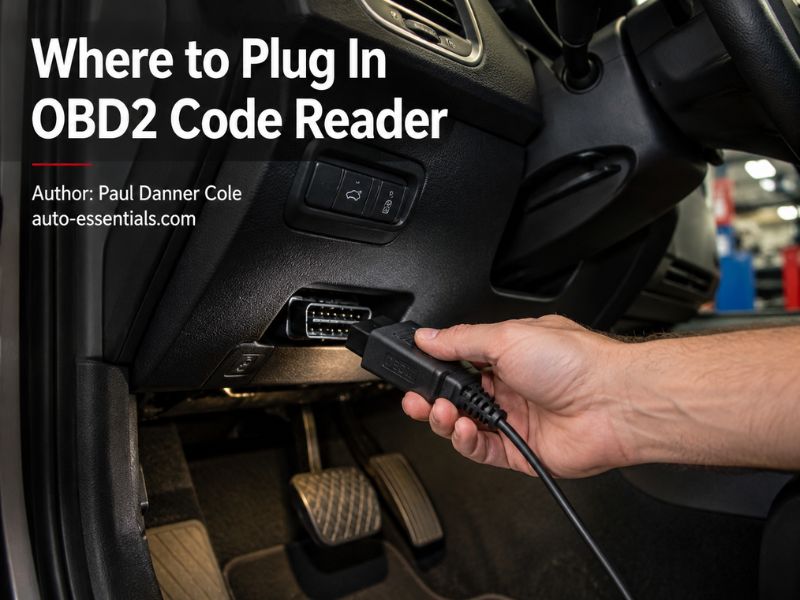
Where to plug in OBD2 code reader? An OBD2 code reader plugs into the vehicle’s OBD2 diagnostic port, which is usually located under the driver’s side dashboard near the steering wheel. In most cars and trucks, the port is within easy reach below the steering column, above the brake pedal area, or near the lower dashboard trim.
The complete details are explained below. In this article, you will learn where to find the OBD2 port, how to connect a code reader correctly, what the connector looks like, why some vehicles hide the port, and what to check if your scanner does not communicate with the vehicle.
Where to Plug In OBD2 Code Reader?
The OBD2 code reader plugs into the 16-pin OBD2 connector, also called the diagnostic link connector (DLC).
In most vehicles, you can find this port:
- Under the driver’s side dashboard
- Near the steering column
- Above or beside the brake pedal
- Behind a small access panel
- Near the lower dashboard trim
The connector is usually exposed and does not require removing any panels.
Most manufacturers place the OBD2 port inside the driver’s cabin because technicians need quick access for emissions testing, diagnostics, and repairs.
Unlike older diagnostic systems, modern OBD2 ports use a standardized connector shape, meaning the same basic scanner can work with many different vehicle brands.
What Does an OBD2 Port Look Like?
An OBD2 port is a small plastic connector with a trapezoid shape and 16 electrical pins inside.
The connector is usually:
- Black or dark-colored plastic
- Mounted under the dashboard
- Open without a protective cover
- Approximately the size of a computer connector
The shape helps prevent the scanner plug from being inserted incorrectly.
Most OBD2 scanners have a matching plug that connects directly into this port.
If you are looking under the dashboard, look for a connector that is not attached to another device. It may be hanging slightly below the dash or mounted into a bracket.
How to Find the OBD2 Port in Your Vehicle
Finding the OBD2 port is usually simple, but the exact location varies by vehicle manufacturer.
Start by sitting in the driver’s seat and looking underneath the steering wheel.
Check these common areas:
Under the Steering Column
This is the most common location. Look below the dashboard near where your knees would be positioned.
Near the Fuse Box
Some vehicles place the OBD2 connector close to the interior fuse panel.
Above the Brake Pedal
Many cars and trucks have the port mounted above the brake pedal area.
Behind a Small Cover
Some manufacturers hide the connector behind a removable dashboard panel for a cleaner interior appearance.
If you cannot find it, check the owner’s manual or search for the diagnostic connector location specific to your vehicle year and model.
How to Plug In an OBD2 Code Reader
Connecting an OBD2 scanner is a simple process.
Follow these steps:
Turn Off the Vehicle
Before connecting the scanner, turn the ignition off.
The scanner can usually be connected with the engine off.
Locate the OBD2 Port
Find the 16-pin diagnostic connector under the dashboard.
Insert the Scanner Plug
Align the scanner connector with the OBD2 port and push it in firmly.
Do not force the plug. The connector is designed to fit only one direction.
Turn the Ignition On
After connecting the scanner, turn the ignition key to the ON position.
For push-button vehicles, press the start button without starting the engine unless your scanner instructions specify otherwise.
Allow the Scanner to Communicate
The scanner will connect with the vehicle’s computer system and display available information.
Depending on the scanner, you may be able to read:
- Check engine codes
- Pending codes
- Freeze-frame data
- Live sensor information
- Readiness monitors
Can You Plug an OBD2 Scanner In While the Car Is Running?
Yes, many OBD2 scanners can be connected while the engine is running, but it is usually recommended to connect the scanner before starting the vehicle.
The typical process is:
- Plug in the scanner
- Turn the ignition on
- Allow communication
- Start the engine if needed
Connecting before startup allows the scanner to establish communication properly.
Some professional technicians connect scanners while the engine is running for live data testing, but beginners should follow the scanner manufacturer’s instructions.
Does the OBD2 Port Always Have Power?
Yes, the OBD2 port usually receives power directly from the vehicle battery.
The power supply allows many scanners to turn on immediately when connected.
A powered scanner does not mean the vehicle is ready for scanning. The ignition usually needs to be turned on so the scanner can communicate with the engine control module.
If your scanner does not power on, possible causes include:
- Blown OBD2 fuse
- Damaged connector
- Poor scanner connection
- Low vehicle battery
Why Won’t My OBD2 Scanner Connect?
If your OBD2 scanner does not communicate with the vehicle, several issues could be responsible.
Common causes include:
Ignition not switched on
Many scanners require the ignition to be in the ON position.
Wrong vehicle information
Some advanced scanners require selecting the correct vehicle details.
Low battery voltage
A weak vehicle battery can prevent communication.
Blown diagnostic port fuse
The OBD2 port often shares power through a fuse. If that fuse fails, the scanner may not turn on.
Poor connection
Make sure the scanner plug is fully inserted into the connector.
Unsupported vehicle
Older vehicles may not support standard OBD2 communication.
Where Is the OBD2 Port on Different Vehicles?
The location can vary by manufacturer.
Common examples:
Ford vehicles:
Usually under the driver’s side dashboard near the steering column.
Chevrolet and GMC trucks:
Often below the dashboard near the steering wheel and fuse panel area.
Toyota vehicles:
Commonly under the driver’s side dash near the lower knee panel.
Honda vehicles:
Usually under the driver’s side dashboard near the steering column.
Ram trucks:
Typically located beneath the driver’s side dashboard.
Although locations differ, manufacturers generally place the connector inside the cabin for easy access.
Can You Leave an OBD2 Scanner Plugged In?
You can leave some OBD2 devices plugged in, especially small Bluetooth scanners designed for continuous monitoring.
However, leaving a scanner connected for long periods can create problems depending on the device.
Potential concerns include:
- Battery drain
- Communication issues
- Electrical problems
- Security concerns with unknown devices
Basic code readers should generally be unplugged after use.
If you use an OBD2 monitoring device regularly, choose one designed specifically for continuous connection.
Is the OBD2 Port the Same on Cars and Trucks?
Yes, modern vehicles use a standardized OBD2 connector.
Cars, trucks, and SUVs sold in markets requiring OBD2 compliance generally use the same 16-pin port.
The difference is not the connector itself but the information available through it.
A basic scanner may only read engine and emissions codes.
A more advanced scan tool may access:
- Transmission modules
- ABS systems
- Airbag systems
- Body control modules
- Manufacturer-specific data
The vehicle determines what information is available.
Can an OBD2 Reader Work Without Internet?
Most basic OBD2 code readers work without internet access.
A wired scanner connects directly to the vehicle and reads information from the onboard computer.
Bluetooth scanners may require a smartphone app, but the actual vehicle connection happens locally through the OBD2 port.
Internet access may be needed for:
- Updating scanner software
- Looking up code definitions
- Accessing repair databases
However, reading basic diagnostic trouble codes does not require an internet connection.
What Should You Do Before Scanning Your Vehicle?
Before plugging in an OBD2 code reader:
Check that the vehicle battery is charged.
Make sure the ignition is turned on correctly.
Identify whether the check engine light or another warning light is active.
Avoid clearing codes before recording the information.
When scanning, save:
- Stored codes
- Pending codes
- Freeze-frame data
- Readiness monitor status
This information helps diagnose the actual problem instead of only removing the warning light.
Can an OBD2 Scanner Damage the Vehicle?
A quality OBD2 scanner used correctly should not damage your vehicle.
The diagnostic port is specifically designed for communication with scan tools.
Problems are usually caused by:
- Poor-quality devices
- Incorrect wiring modifications
- Short circuits
- Damaged connectors
Avoid using unknown devices that claim to modify vehicle performance unless you understand how they work.
For normal code reading and diagnostics, an OBD2 scanner is a safe tool.
Final Thoughts
So, where to plug in OBD2 code reader? The scanner connects to the vehicle’s OBD2 port, which is usually located under the driver’s side dashboard near the steering wheel.
Finding and using the port is generally simple. Plug the scanner into the 16-pin connector, turn the ignition on, and allow the device to communicate with the vehicle’s computer.
An OBD2 scanner is one of the most useful tools for understanding check engine lights and diagnosing modern vehicles. Always record diagnostic information before clearing codes, and use the scan results as a starting point for proper repairs.