How to Read a Car Code Reader: Complete Beginner Guide
How to read a car code reader starts with understanding the information displayed by an OBD2 scanner. A car code reader retrieves diagnostic trouble codes from your vehicle’s computer and helps identify which system detected a problem.
A code reader does not directly tell you which part has failed. Instead, it provides clues about the affected system, allowing you to perform further testing before making repairs.
The complete details are explained below. You will learn how to connect a car code reader, understand code formats, interpret common trouble codes, read live data, and avoid common diagnostic mistakes.
What Is a Car Code Reader?
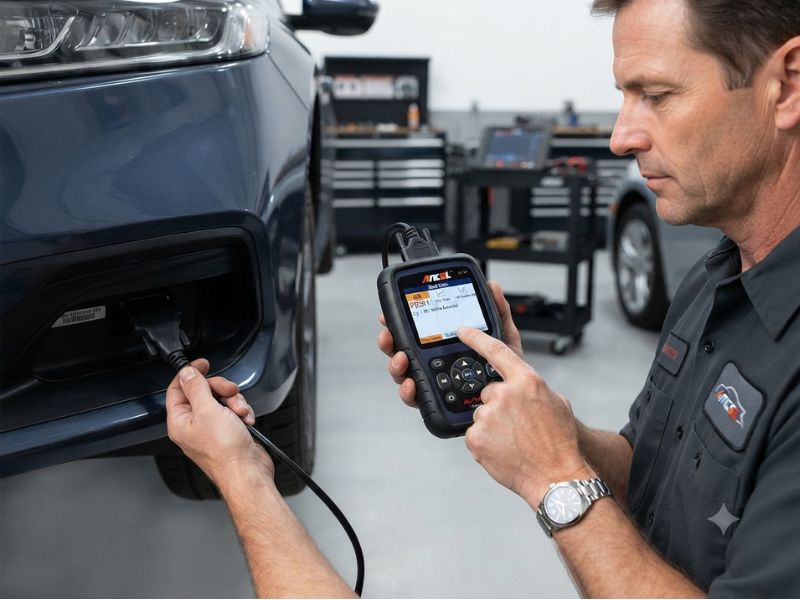
A car code reader is a diagnostic device that communicates with your vehicle’s onboard computer system.
Modern vehicles use electronic control modules to monitor different systems, including:
- Engine
- Transmission
- Fuel system
- Emissions
- ABS brakes
- Airbags
- Body electronics
When the computer detects an abnormal condition, it stores a Diagnostic Trouble Code (DTC).
A car code reader connects to the vehicle’s OBD2 port and retrieves these stored codes.
A basic code reader can usually:
- Read engine codes
- Display code descriptions
- Clear some warning lights
- Check emissions readiness
Advanced scanners can also access:
- Transmission modules
- ABS systems
- Airbag systems
- Live sensor data
- Manufacturer-specific information
How to Connect a Car Code Reader
Before learning how to read the results, you need to connect the device correctly.
Follow these steps:
1. Locate the OBD2 Port
The OBD2 connector is usually located under the driver’s side dashboard.
Common locations include:
- Below the steering wheel
- Near the fuse box
- Above the brake pedal area
- Behind a small cover panel
The connector has 16 pins and is normally easy to identify.
2. Turn the Ignition On
Insert the key or press the start button without starting the engine.
Most scanners need the vehicle’s electrical system active to communicate.
3. Connect the Scanner
Plug the code reader into the OBD2 port.
The scanner usually receives power directly from the vehicle.
4. Select Vehicle Information
Some advanced scanners may ask for:
- Vehicle year
- Make
- Model
- Engine type
Others automatically identify the vehicle.
5. Choose Read Codes
Select options such as:
- Scan
- Read Codes
- Diagnose
- Trouble Codes
The scanner will communicate with the vehicle computer and display stored information.
Understanding Car Code Reader Results
A typical diagnostic code looks like:
P0301
Each part of the code provides information.
The code contains:
- One letter
- Four numbers
Example:
P0301
Breaking it down:
P = Powertrain system
0 = Generic OBD2 code
3 = Ignition/misfire-related category
01 = Specific fault location
Understanding this structure helps you quickly identify the type of problem.
What Do the Letters on Car Codes Mean?
The first letter identifies the vehicle system.
P Codes – Powertrain
Powertrain codes are the most common.
They relate to:
- Engine
- Transmission
- Fuel system
- Emissions
Examples:
- P0300
- P0171
- P0420
Most Check Engine Light problems are P-codes.
B Codes – Body
Body codes relate to comfort and safety systems.
Examples:
- Airbags
- Climate control
- Door electronics
- Seat systems
Many B-codes require advanced scanners.
C Codes – Chassis
Chassis codes involve vehicle movement and safety systems.
Examples:
- ABS
- Steering
- Suspension
U Codes – Network Communication
U-codes indicate communication problems between vehicle computers.
Possible causes include:
- Wiring problems
- Low battery voltage
- Module failure
How to Read Stored, Pending, and Permanent Codes
Most scanners show different types of trouble codes.
Stored Codes
Stored codes are confirmed problems detected by the vehicle computer.
These codes often turn on warning lights.
Example:
A stored P0301 means the computer has confirmed a cylinder 1 misfire condition.
Pending Codes
Pending codes are possible problems that have not happened enough times to become confirmed.
They may disappear if the issue does not occur again.
Permanent Codes
Permanent codes are usually related to emissions problems.
They remain stored until the vehicle completes self-tests and confirms the repair.
A scanner may not be able to manually erase them.
How to Read Common Car Scanner Codes
Understanding common codes helps you interpret scanner results.
P0300 – Random Misfire Detected
This code means the engine computer detected misfires in multiple cylinders.
Possible causes:
- Worn spark plugs
- Bad ignition coils
- Fuel problems
- Vacuum leaks
- Low compression
The code does not automatically mean the engine needs major repairs.
P0301 – Cylinder 1 Misfire
This indicates a misfire detected in cylinder one.
Possible causes:
- Spark plug failure
- Ignition coil problem
- Injector issue
- Wiring problem
- Mechanical engine fault
Testing is required before replacing parts.
P0171 – System Too Lean
This means the engine is receiving too much air or not enough fuel.
Possible causes:
- Vacuum leak
- Dirty airflow sensor
- Weak fuel pump
- Intake leak
P0420 – Catalyst Efficiency Below Threshold
This code relates to catalytic converter performance.
Possible causes:
- Weak catalytic converter
- Exhaust leak
- Oxygen sensor issue
- Engine running problems
Replacing the catalytic converter immediately may not solve the problem.
P0700 – Transmission Control System Fault
This indicates that the transmission computer detected a problem.
A basic scanner may only show P0700.
An advanced scanner may be needed to access the detailed transmission fault.
Reading Freeze-Frame Data
Many car code readers display freeze-frame data.
Freeze-frame shows vehicle conditions when the code was triggered.
Information may include:
- Engine RPM
- Vehicle speed
- Coolant temperature
- Fuel trim
- Engine load
- Throttle position
This information helps determine when the problem occurred.
For example:
A misfire during acceleration may indicate a different problem than a misfire at idle.
Reading Live Data From a Car Code Reader
Advanced code readers can display real-time sensor information.
Common live data includes:
- Engine RPM
- Coolant temperature
- Throttle position
- Oxygen sensor readings
- Fuel trims
- Airflow data
- Vehicle speed
Live data helps confirm whether sensors are operating correctly.
For example:
If the coolant temperature reading is incorrect, the sensor or wiring may be faulty.
If fuel trims are extremely high, the engine may be compensating for a lean condition.
Can a Car Code Reader Tell You the Exact Problem?
No.
A code reader identifies the system where the computer detected an issue.
It does not always identify the exact failed component.
Example:
A code for an oxygen sensor problem does not guarantee the oxygen sensor is bad.
Possible causes include:
- Exhaust leaks
- Wiring damage
- Fuel problems
- Vacuum leaks
- Sensor failure
A complete diagnosis requires additional testing.
What Should You Do After Reading a Code?
After getting a code:
Record the Information
Write down:
- Code number
- Description
- Stored or pending status
- Freeze-frame data
Research the Code
Use information specific to your:
- Vehicle year
- Make
- Model
- Engine
Inspect Related Components
Check:
- Wiring
- Connectors
- Hoses
- Fluid levels
- Visible damage
Test Before Replacing Parts
Avoid replacing expensive parts based only on a code description.
Clear Codes After Repair
Clear the code only after the repair is complete.
Why Does the Same Code Return After Clearing?
If a code returns, the underlying issue is likely still present.
Common reasons include:
- Incorrect repair
- Failed replacement part
- Additional hidden problem
- Wiring issue
- Mechanical failure
Repeated codes require deeper diagnosis.
Can a Car Code Reader Read ABS, Airbag, and Transmission Codes?
It depends on the scanner.
Basic OBD2 readers usually focus on engine and emissions systems.
Advanced scanners may access:
- ABS
- Airbags
- Transmission
- Body control modules
Before buying a scanner, check whether it supports the systems you need.
A scanner that reads engine codes may not read safety or transmission modules.
Common Mistakes When Reading Car Codes
Replacing Parts Immediately
A code does not always mean that the named component failed.
Ignoring Multiple Codes
Several codes together often provide better clues.
Clearing Codes Too Early
You may lose useful diagnostic information.
Using Generic Information Only
Vehicle-specific information may change the diagnosis.
Ignoring Symptoms
Scanner results should always be combined with actual vehicle behavior.
Final Thoughts
Learning how to read a car code reader helps you understand what your vehicle’s computer is reporting. A code reader can identify affected systems, display trouble codes, show useful data, and guide troubleshooting.
However, the code is only the beginning of the diagnostic process. It tells you where to look, not always what part to replace.
The best approach is to read the code carefully, understand the system involved, inspect possible causes, and confirm the repair before replacing components.