Welder Cooling Fans: Airflow, Problems, and Basic Checks
A welder’s cooling fan moves heat away from internal parts, and the right first checks are to confirm the airflow path, clear blocked vents, and note any fault lights or unusual sounds. Some welders run the fan continuously, while others switch it on only when needed, so silence by itself doesn’t prove a problem.
Have you noticed your welder shutting down halfway through a job, or a fan that suddenly sounds rough? It’s frustrating when a simple repair might be possible, but opening an energized machine can put you in real danger.
I once spent too long chasing a suspected control-board fault when a packed vent was the more likely problem. The machine was dusty enough to make the air smell warm, and I’d skipped the plain old airflow check. That’s a common mistake, not a dumb one.
I wrote this to help you sort normal fan behavior from signs of trouble, starting with checks you can make safely from outside the case. You’ll also know when the next step belongs to a trained repair technician.
Get the fan issue right, and you can avoid needless downtime, protect the welder from overheating, and make a better call about repair costs. Ignore a real airflow problem, and a thermal shutdown can interrupt work or continued overheating can damage parts.
This takes about 9 minutes to read. By the end, you’ll know how to:
- Tell when quiet fan operation may be normal.
- Check vents and airflow without opening the welder.
- Recognize fan failure, electrical faults, and overheating.
- Decide when cleaning is enough and when to call for service.
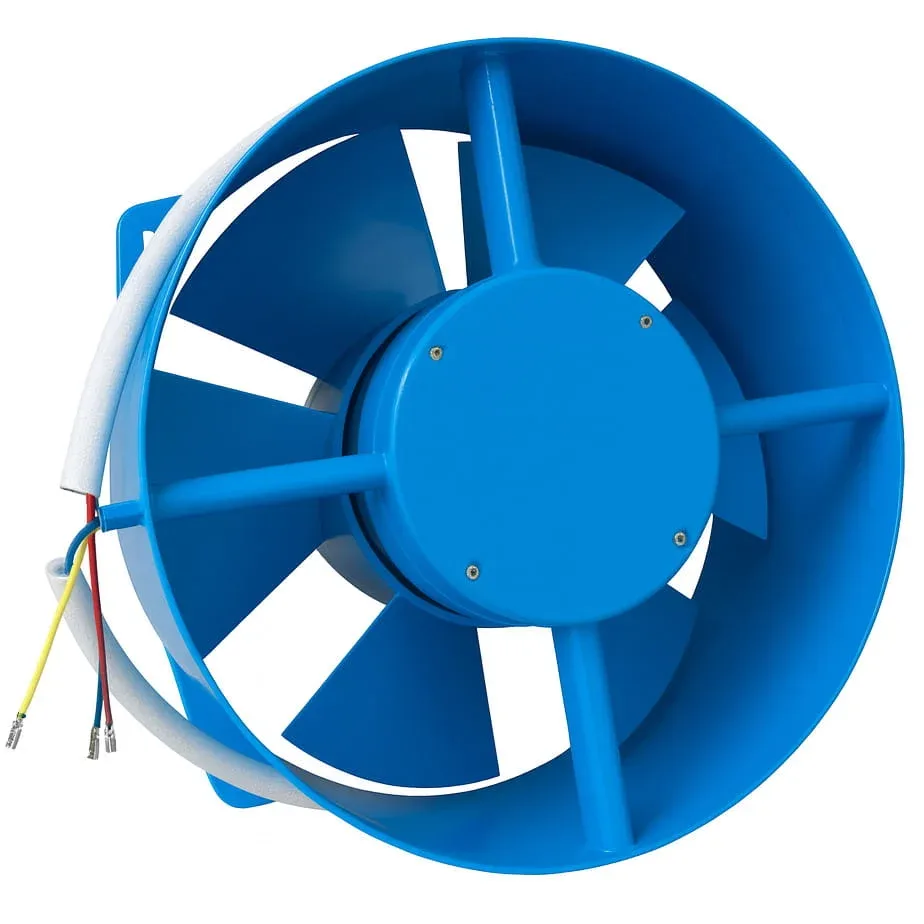
Welder Cooling Fan: What It Does and How to Check It
A welder cooling fan pulls or pushes air through the machine to carry heat away from components such as power electronics and transformers. Check the intake and exhaust vents, confirm that air can pass through them, and compare the fan’s behavior with the welder’s manual.
The cooling fan is part of the machine’s cooling system, not a general-purpose shop fan. Its job is to move air along a planned route inside the case, so a blocked intake can matter even if the fan still spins.
Start with these checks while the machine is switched off and unplugged:
- Find the air intake and exhaust openings. Their locations vary by model, and some vents may be on the sides or rear.
- Move the welder away from a wall, curtain, pile of material, or other object that blocks a vent.
- Look for dust, lint, metal grit, or dried mud covering the vent openings.
- After reconnecting power, note whether the fan runs at startup, during welding, or only after the welder heats up. Use the manual to tell what’s normal for your model.
- Pay attention to the duty cycle, the amount of welding time allowed within a set period before the machine needs to cool. A thermal light or shutdown can follow a long weld even when the fan works.
Airflow direction and fan behavior aren’t identical across welders. A fan may push air into the case or draw it out, and temperature-controlled models may keep the fan off when the machine is cool. If you’re not sure which vents are intake and exhaust, check the model’s diagrams instead of guessing from the fan grille.
A practical check is to feel for airflow at the exhaust while the fan is running, keeping hands and loose clothing away from openings. Weak airflow can point to a dirty grille, a failing fan, or an obstruction inside the case. Don’t put a tool, finger, or wire through a vent to test the fan.
Pro Tip: Keep the welder’s intake clear of grinding dust and welding debris. A machine parked right beside a grinder can swallow fine grit all afternoon, even if its vents look clean from across the shop.
What Welder Cooling Fan Problems Look and Sound Like
A cooling fan problem can show up as weak airflow, scraping or rattling sounds, repeated thermal shutdowns, or a fan that never starts when the manual says it should. Those signs help narrow the cause, but none proves the fan motor has failed on its own.
| What you notice | Possible cause | Safe first check |
|---|---|---|
| Fan stays off when the welder is cold | Normal temperature-controlled operation | Check the manual’s fan behavior |
| Fan doesn’t start as the machine heats up | Fan, wiring, control, or temperature-sensor fault | Stop welding and arrange service |
| Fan runs but airflow feels weak | Blocked vents, dust buildup, or worn fan | Clear outside obstructions |
| Rattling, scraping, or grinding | Fan blade contact, loose debris, or worn bearing | Switch off and unplug the welder |
| Thermal warning or shutdown | Long duty cycle, blocked airflow, hot conditions, or fault | Let the machine cool and check its vents |
A sudden change is more useful than a single sound or symptom. If the fan used to run during a certain kind of job and now stays silent, note what changed: work duration, ambient heat, the welder’s position, and whether the machine shows a warning light.
When the machine shuts down, does the fan start again after it cools? If it does, that points toward heat buildup or a protective shutdown, but it doesn’t rule out a weak fan or restricted airflow. Give the welder time to cool according to its manual before trying again.
I once treated a rough fan noise as a minor annoyance and kept working until the machine’s thermal protection interrupted the job. The delay turned a quick pause into a frustrating stop in the middle of a weld. Since then, I take new fan noise as a reason to stop and check for an obvious obstruction.
Keep unrelated symptoms in their lane, too. A wire-feed issue can come from worn or mismatched MIG welder drive rolls, while a gas-flow problem may point toward the welding machine gas solenoid valve. Neither part is the cooling fan, so sorting symptoms by system can save you a lot of guesswork.
A welder’s fault code or thermal indicator is worth checking against the manual rather than decoding from memory. If the fan doesn’t run when the manual says it should, or the machine repeatedly overheats after a proper cooling break, stop using it until the cause is checked.
Important Tip: Never bypass a thermal protection device to finish a weld. That protection is there to limit heat-related damage, and defeating it can turn a fan problem into a much more expensive repair.
Cleaning and Maintaining A Welder Cooling Fan
Routine cleaning can help when dust or debris blocks the outside vents, but cleaning won’t fix a failed fan motor or an internal electrical fault. Unplug the welder, follow its manual, and clean only the areas the manufacturer says you can reach safely.
Before cleaning, look for instructions about dust removal and access panels. A welder can contain electrical parts that hold a dangerous charge after power is disconnected, so don’t remove the case just to reach the fan unless you’re qualified and the manufacturer’s procedure allows it.
For basic outside cleaning:
- Unplug the machine and let it cool.
- Use a soft brush or a vacuum at the vent opening to lift loose dust.
- Keep the nozzle, brush, and hands outside the case.
- Avoid pushing dirt deeper into the welder with forceful airflow.
- Check that the vents are clear before returning the machine to its normal position.
A dirty exterior grille is a different problem from dust coating internal parts. If the openings are clear but airflow remains weak, stop there and arrange service rather than trying to blow debris through the machine. Fine dust can settle on internal parts, and a casual blast may spread it farther.
I prefer cleaning the vent openings with a soft brush or vacuum because I can control where the debris goes. Compressed air can be handy in the right hands, but a hard blast into the grille may drive grit deeper into the case or spin a fan faster than intended.
Give the welder enough open space for air to move around it, especially in a tight garage or a hot work area. A clear vent won’t help much if the exhaust blows straight into a wall and circles back toward the intake.
When to Repair or Replace the Fan
A welder cooling fan that has stopped, runs noisily, or moves little air may need repair, but a technician should confirm the fault before parts are replaced. Internal checks can expose hazardous voltage, stored electrical charge, and wiring that’s easy to damage.
The fan may be powered or controlled in different ways depending on the welder. Its motor, wiring, temperature sensor, or control board could be involved, so replacing the fan based only on a symptom can waste money and leave the real problem unfixed.
Stop using the welder and seek qualified service if you notice:
- A burning smell, smoke, or melted-looking parts.
- A fan blade that scrapes, wobbles, or stops unexpectedly.
- Repeated overheating despite clear vents and proper cooling breaks.
- A fan that fails to run when the manual says it should.
- A need to remove the case or test internal wiring to find the fault.
Before asking for a repair, write down the model number, the warning light or code, when the fan runs, and what you were doing when the issue appeared. That short list can make the first conversation more useful and help distinguish a cooling problem from a normal duty-cycle pause.
Replacement fans must match the welder’s requirements for voltage, current, size, airflow direction, connector, and mounting. A fan that fits the opening can still be the wrong part if its electrical rating or airflow is different. I’d use the parts list or confirm compatibility with the manufacturer or a repair shop rather than choosing by appearance.
Some machines are easier to service than others, and a new fan may be only one item in a broader repair. A qualified technician can check the fan circuit and related components, while guidance on welding machine replacement parts can help you understand why matching the correct part matters.
If you’re comparing repair with replacement, ask for the confirmed fault and the expected work before approving the job. I wouldn’t spend money on a guessed-at fan replacement when the machine may have a control fault, especially if a basic diagnosis can narrow it down first.
- A fan that stays off can be normal on a temperature-controlled welder.
- Clear vents and check the manual before assuming the fan has failed.
- Stop using the machine if it overheats repeatedly, smells burnt, or makes a new scraping sound.
- Leave internal electrical checks to a qualified repair technician.
FAQs About Welder Cooling Fan
Should a welder cooling fan run all the time?
No, not every welder cooling fan runs continuously. Some machines switch the fan on when internal parts reach a temperature threshold, while other designs run it more often. Check the manual for your model’s expected behavior, and treat a change from its normal pattern as more meaningful than silence alone.
Can I use my welder if the cooling fan is not working?
No, don’t keep welding if the fan should be running but has stopped. A machine may overheat and shut down, and continued use can put extra strain on internal parts. Turn it off, unplug it, let it cool, and arrange service if the manual’s checks don’t explain the behavior.
Why does my welder cooling fan keep running after welding?
A cooling fan may keep running after welding to remove heat left in the machine. The run time depends on the welder’s design and temperature, so follow its manual rather than using a fixed number of minutes. If the fan never stops or sounds rough, have the machine checked.
Can I replace a welder cooling fan myself?
Only replace a welder cooling fan if you’re qualified to work on that machine and can follow its service instructions safely. Unplugging a welder doesn’t always remove the risk from stored electrical charge. If access requires opening the case or testing wiring, a qualified repair technician is the safer choice.
How do I know if my welder is overheating?
A thermal warning, unexpected shutdown, or repeated cooling pauses can signal overheating. Check the manual for the machine’s lights and codes, then inspect the outside vents and consider the duty cycle. Don’t rely on the case feeling warm or cool; temperature at the surface doesn’t confirm internal conditions.
Keep Airflow Simple and Take Fan Changes Seriously
A welder’s cooling fan is easy to overlook until a job stops halfway through, but the first checks are plain: clear vents, proper space around the machine, and fan behavior that matches the manual. Those steps can catch a blocked airflow path without turning a small concern into an unsafe repair attempt.
My practical view is to treat a new noise or a repeated thermal shutdown as a reason to pause, not a challenge to push through. If the basic outside checks don’t explain the problem, leave the case closed and ask a qualified technician to diagnose the machine. Start by noting the welder’s model and exactly what the fan does; that’s the clearest next step.